Uitly Review: Is Uitly.com Worth Using?
Published: 1 Nov 2026
Uitly is a link management and marketing platform that helps users create short links, QR codes, and bio pages. It also provides analytics, smart targeting, branded domains, deep links, and other tools for managing online campaigns. Before exploring the platform in detail, let’s look at what Uitly offers.
Quick Info About Uitly
Here is a quick look at the main details of Uitly com.
Uitly
uitly.com Ahrefs
 Semrush
 Moz
Uitly.com is a digital marketing and link management platform. Its main tools include URL shortening, dynamic QR codes, bio pages, smart deep links, analytics, branded domains, team management, and a developer API. The platform also provides a free package with options to upgrade to premium features.
This detailed review looks at Uitly from a user and business point of view. We will cover its main tools, features, analytics, QR codes, bio pages, pricing approach, integrations, API, security features, and overall experience.
What Is uitly?
Uitly is a link management and digital marketing platform. It allows users to shorten long URLs and create trackable short links for different campaigns.
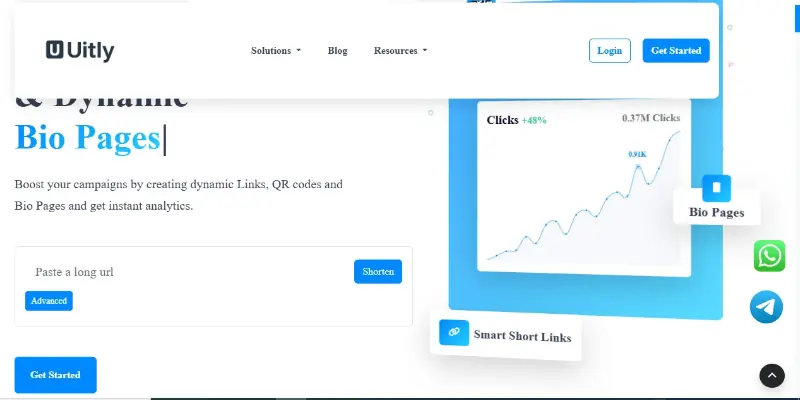
The platform also provides QR codes and bio pages. These tools can help businesses, marketers, creators, and other users manage links and share multiple types of content from one place.
Uitly is therefore more than a basic URL shortener. It combines link creation with analytics, targeting, campaign management, team collaboration, and other marketing features.
How Does uitly.com Work?
Uitly.com works through a collection of online link and marketing tools. Users can create a short link, customize it, and track how people interact with it.
The platform includes:
- URL Shortener: Converts long URLs into shorter and easier-to-share links.
- QR Codes: Creates QR codes that can be customized and tracked.
- Bio Pages: Creates pages where users can place multiple links and other content.
- Smart Deep Links: Helps direct users to mobile apps when supported.
- Analytics: Tracks clicks, locations, referrers, and other link activity.
- Branded Domains: Allows users to use their own domain for short links.
- Campaigns: Helps organize links, QR codes, and bio pages.
- Team Management: Allows teams to work together with assigned permissions.
- Developer API: Lets developers connect Uitly features with their own applications.
What Tools Does Uitly Offer?
Uitly offers several tools for people who need to manage links and digital campaigns.
1. URL Shortener
The URL shortener turns long and complex web addresses into shorter links. Users can also use custom aliases and additional options depending on their account features.
Short links can be useful for social media, marketing campaigns, printed materials, and other places where a long URL may look inconvenient.
2. QR Code Generator
Uitly provides a QR code generator that supports different types of information.
Users can create QR codes for:
- URLs
- Text
- SMS
- Phone calls
- Wi-Fi
- vCards
- Events
- Social profiles
- Other supported information
The platform also provides customization options. Registered users can access additional options such as dynamic QR codes, advanced customization, frames, and logos.
3. Bio Pages
Uitly’s Bio Pages feature allows users to create a single page containing multiple links and other content.
The platform says users can add different widgets and content types, including videos, music, social posts, donation options, maps, forms, and other supported integrations. Bio Pages are designed to work well for social media profiles.
What Features Does uitly.com Provide?
Uitly.com includes several features beyond basic link shortening.
- Custom Aliases: Users can create more memorable short-link names.
- Password Protection: The platform provides password options for supported links.
- Branded Domains: Users can connect their own domain for short links.
- Advanced Targeting: Links can be targeted based on countries, languages, and devices.
- Event Tracking: Users can add tracking pixels to monitor events.
- A/B Testing: The platform lists A/B testing among its marketing features.
- Custom Meta Tags: Users can manage meta information for supported links and pages.
- Team Management: Teams can collaborate and use different permissions.
- Campaigns and Channels: Links and other assets can be grouped and organized.
- Developer API: Developers can connect Uitly with their own applications.
- Notifications: The platform supports notifications through services such as Slack and webhook tools.
Uitly for Link Shortening
Link shortening is one of the main features of Uitly.
Instead of sharing a long URL, users can create a shorter version that is easier to remember and share.
Uitly also goes beyond simple shortening by providing tracking options. Users can review information such as clicks, countries, and referrers to understand how their links are being used.
This can be useful for:
- Social media links
- Marketing campaigns
- Email campaigns
- Business promotions
- Printed materials
- Website links
- Affiliate campaigns
Uitly for QR Codes
QR codes are another major part of the platform.
Uitly allows users to create QR codes for different types of information. Its QR code tool includes options for URLs, text, email, phone numbers, Wi-Fi, contact details, social profiles, and other supported data types.
The platform also supports dynamic QR codes for registered users. These can provide tracking information so users can understand when and where their QR codes are being scanned.
This makes the QR code feature useful for both online and offline campaigns.
Uitly Bio Pages
The Bio Pages feature is designed for users who want to share several links through one page.
A user can create a page and add different links, media, buttons, and widgets. The platform lists integrations for services such as YouTube, Spotify, TikTok, Instagram, Pinterest, Reddit, Calendly, Google Maps, and others.
Bio Pages can be useful for:
- Social media creators
- Influencers
- Small businesses
- Freelancers
- Marketers
- Musicians
- Online stores
- Personal brands
The pages are also designed to be mobile-friendly.
Smart Deep Linking on Uitly
Uitly also provides Smart Deep Linking.
This feature is designed to send users directly to a mobile app when the app is installed. If the app is not installed, the system can direct users toward an appropriate download or web destination.
The platform lists support for many popular apps and also provides options for users to add their own app links.
This can be useful for businesses and app marketers who want to connect web campaigns with mobile applications.
Uitly Analytics and Tracking
Analytics are an important part of the Uitly platform.
The website says users can track information such as:
- Number of clicks
- User location
- Referrer
- QR code scans
- Bio Page visits
- Link activity
- Campaign performance
The platform also supports tracking pixels from services such as Google Tag Manager and other providers.
This information can help users understand how their links and campaigns are performing.
Uitly for Businesses and Marketers
Uitly can be useful for businesses that use links as part of their marketing campaigns.
A business can use the platform to create short links, branded URLs, QR codes, landing pages, and trackable campaigns.
Some useful business features include:
- Branded domains
- Campaign organization
- Smart targeting
- Event tracking
- Team management
- Analytics
- Custom landing pages
- CTA overlays
- Third-party integrations
- API access
These features make Uitly suitable for more than simple link shortening.
Uitly for Social Media Users
Social media users can also use Uitly to manage multiple links.
The Bio Pages feature can place several important links on one page. Users can then share one profile link instead of adding several separate URLs to their social profiles.
The platform supports different widgets and integrations, including social media profiles, videos, music, forms, maps, and other content.
This can make it easier for followers to find different online profiles and resources from one place.
Uitly for Teams
Uitly includes team management features for users who work with other people.
The platform allows users to invite team members and assign different privileges. Teams can also work across different workspaces while managing links, Bio Pages, and QR codes.
This can be useful for:
- Marketing teams
- Agencies
- Business teams
- Social media teams
- Developers
- Campaign managers
Team features can make link management easier when several people need access to the same account or campaign.
Uitly Developer API
Uitly also provides a Developer API for users who want to connect its features with other applications.
The API documentation says an API key is generated after registration and must be used for API requests. The documentation includes examples for different programming languages and provides endpoints for areas such as accounts, links, branded domains, campaigns, channels, and pixels.
The API documentation also describes rate limits and authentication requirements.
Developers should keep API keys private and follow the latest official API documentation when building integrations.
Uitly Integrations
Uitly supports integrations with several third-party services.
The website lists services and platforms such as:
- Google Analytics
- Google Tag Manager
- Slack
- Zapier
- Quora
- TikTok
- Adroll
- Facebook tracking tools
These integrations can help users connect link activity with other marketing and analytics systems.
The available integrations may change over time, so users should check the current platform before setting up a campaign.
Uitly Pricing and Free Plan
Uitly provides a free package and also allows users to upgrade to premium features.
Its Help Center says users can start with the free package and upgrade when they need additional features. The subscription section also explains that charges are made at the beginning of each billing period until the subscription is canceled.
The exact pricing and available features can change, so it is better to check the current pricing page before choosing a plan.
The platform also provides information about refunds and account deletion through its Help Center.
Uitly Help Center and Support
Uitly provides a Help Center for users who need assistance.
The Help Center currently contains topics covering subscriptions, tracking pixels, Google Ads, Facebook Pixel, LinkedIn Insight Tag, Google Tag Manager, and other features.
The platform also has a Contact Us page where users can submit their name, email, and message. This gives users more than one way to find information or ask for help.
Uitly Security and Link Reporting
Uitly includes a link reporting feature for users who come across risky or dangerous short links.
The Report Link page asks users to provide an email, the short link, and a reason for the report. Uitly says it will review reported cases and take measures to remove problematic links.
This is useful because shortened URLs can hide their destination. A reporting system gives users a way to flag links they believe may be unsafe. Users should still avoid opening suspicious links and should use normal online security practices.
Uitly Website Features
Uitly has a clean tool-focused structure that makes its main services easy to identify.
Some of its notable website features include:
- Short Link Tool: Create shorter URLs from long web addresses.
- QR Code Generator: Create static and dynamic QR codes.
- Bio Pages: Build pages containing multiple links and widgets.
- Smart Links: Use deep linking for supported mobile apps.
- Analytics: Track clicks, locations, referrers, and other activity.
- Branded Domains: Connect custom domains to short links.
- Campaigns: Organize links and marketing assets.
- Team Management: Collaborate with other users.
- API: Connect Uitly with external applications.
- Help Center: Find guides and answers to common questions.
- Contact Form: Contact the platform directly.
- Report Link: Report suspicious or risky short links.
Uitly Pros and Cons
A balanced review should look at both useful features and areas users should consider.
Pros
- Provides URL shortening and link management.
- Includes QR code creation.
- Offers Bio Pages for multiple links.
- Provides analytics and tracking.
- Supports branded domains.
- Includes smart targeting.
- Provides deep linking features.
- Supports team collaboration.
- Offers a Developer API.
- Has a Help Center.
- Provides a free package.
- Includes a link reporting feature.
Cons
- Advanced features may require registration or a paid plan.
- The number of available features may feel complex for someone who only needs a basic URL shortener.
- Some QR code customization options require registration.
- Subscription charges continue automatically until canceled according to the Help Center.
- Users working with sensitive campaigns should review the platform’s privacy and tracking settings carefully.
- API users need to understand authentication and rate limits before building integrations.
Is Uitly Legit and Safe to Use?
Uitly presents itself as a link management platform with tools for URL shortening, QR codes, Bio Pages, analytics, and digital marketing. Its website also provides a Help Center, API documentation, Contact Us page, subscription information, and a link reporting system.
The platform also provides account registration and subscription documentation. Its Help Center explains that users can start with a free package and upgrade to premium features.
As with any online service, users should protect their account credentials and API keys. Developers should keep API keys secret, as the official API documentation specifically warns users to protect them from misuse.
For short links from any service, users should still be careful before opening unknown destinations.
Who Should Use Uitly?
Uitly can be useful for several types of users.
- Businesses: Businesses can use branded links, QR codes, analytics, and campaign tools.
- Marketers: Marketers can use tracking, targeting, campaigns, and integrations.
- Social Media Creators: Creators can use Bio Pages to share several links from one profile.
- Freelancers: Freelancers can create branded links and pages for their services.
- Agencies: Teams can use collaboration and campaign management features.
- Developers: Developers can use the API to connect Uitly with other applications.
- App Marketers: Businesses promoting mobile apps can use Smart Deep Linking.
- General Users: People who simply need short links or QR codes can also use the basic tools.
uitly com and Its Domain
The platform uses uitly.com as its main domain. The brand name displayed across the website is UITLY.
People may search for the platform using phrases such as uitly com or uitly.com. These refer to the same brand and domain rather than separate services.
When accessing the platform, check the complete domain to make sure you are using the intended website.
Common Uitly Search Variations
People may search for Uitly using different forms of its brand and domain name.
Common variations include:
- uitly
- uitly com
- uitly.com
These are simple brand and domain variations rather than separate platforms.
If you want to access the official platform, uitly.com is the main domain to check.
What Makes Uitly Different From a Simple URL Shortener?
A basic URL shortener mainly changes a long URL into a shorter one.
Uitly goes beyond that basic function. It combines short links with QR codes, Bio Pages, analytics, deep linking, branded domains, targeting, campaign management, team collaboration, integrations, and API access.
This gives users a wider set of tools for managing links and digital campaigns.
For someone who only needs a simple short URL, many of these features may not be necessary. For businesses, marketers, teams, and developers, the additional tools can provide more options for managing online links.
Final Thoughts on Uitly
In this detailed review, we covered the main things you should know about Uitly, including its website type, URL shortener, QR code generator, Bio Pages, analytics, smart links, integrations, API, pricing approach, support options, and security features.
Uitly.com is best understood as a link management and digital marketing platform, not a traditional blog or content website. Its main tools focus on short links, QR codes, Bio Pages, tracking, targeting, branded domains, and campaign management.
For individuals, the basic link and QR code tools may be useful for simple sharing needs. For businesses and marketers, the analytics, branded domains, targeting, campaigns, and integrations provide additional options.
If you plan to use Uitly for business campaigns, social media, QR codes, or API development, check the current feature and pricing details before choosing a plan.
FAQs About Uitly
Here are some of the most commonly asked questions related to Uitly.
1. What is Uitly?
Uitly is a link management and digital marketing platform. It provides tools for shortening URLs, creating QR codes, building Bio Pages, tracking clicks, managing campaigns, and creating smart links.
2. What is the official Uitly website?
The official website is uitly.com. You may also see people searching for uitly com or uitly when looking for the platform.
3. What does Uitly do?
Uitly helps users manage and track online links. Its tools include URL shortening, QR codes, Bio Pages, analytics, branded domains, smart targeting, deep links, team management, and API access.
4. Does Uitly have a free plan?
Yes. Uitly’s Help Center says users can start with a free package and upgrade to premium features when needed. The available features and pricing can change, so users should check the current pricing information before subscribing.
5. Can I create QR codes with Uitly?
Yes. Uitly provides a QR code generator that supports different types of information, including URLs, text, email, phone numbers, Wi-Fi, contact information, and other options.
It also provides dynamic QR code features for registered users.
6. Does Uitly provide a URL shortener?
Yes. URL shortening is one of the main features of Uitly.
Users can turn long URLs into shorter links and use tracking features to understand how those links are being used.
7. What are Uitly Bio Pages?
Uitly Bio Pages allow users to place multiple links and other content on one page.
They can be useful for social media profiles, creators, businesses, freelancers, and anyone who wants to share several online resources through one link.
8. Does Uitly provide analytics?
Yes. Uitly provides tracking and analytics for its links and other supported tools. The platform can provide information such as clicks, locations, referrers, QR code activity, and Bio Page visits.
9. Does Uitly have an API?
Yes. Uitly provides a Developer API. The official API documentation explains authentication, API keys, rate limits, and different endpoints for managing account data, links, domains, campaigns, channels, and pixels.
10. Is Uitly safe to use?
Uitly provides several support and security-related features, including account controls, API documentation, a Help Center, and a system for reporting risky links.
Users should still protect their passwords and API keys and avoid opening unknown short links.





- Be Respectful
- Stay Relevant
- Stay Positive
- True Feedback
- Encourage Discussion
- Avoid Spamming
- No Fake News
- Don't Copy-Paste
- No Personal Attacks
- Be Respectful
- Stay Relevant
- Stay Positive
- True Feedback
- Encourage Discussion
- Avoid Spamming
- No Fake News
- Don't Copy-Paste
- No Personal Attacks
