LGA Tools – Detailed lga tools com Review: Online Tools
Published: 30 Oct 2026
Sometimes, we need simple online tools for everyday tasks. These tools can help with calculations, images, text, and other small jobs. Recently, I came across LGA Tools com. So, I decided to explore and test the website myself.
Quick Info Table
Here is some quick information about the LGA Tools website:
LGA Tools
lgatools.com Ahrefs
 Semrush
 Moz
Now, you have a basic idea about LGA Tools. The website offers different online tools for calculations, image editing, text tasks, and more. I explored several tools to see how they work and how easy they are to use. I also checked the main features and different sections of the website. In this review, I will cover its tools, features, pros, cons, and other important details.
Now, without wasting more time, let’s dive into the detailed LGA Tools com review. We will explore its tools, features, and overall website experience. Let’s get started!
What is LGA Tools?
LGA Tools is a free, web-based platform that brings hundreds of everyday digital tools together onto one simple website. Instead of searching Google and visiting ten different sites to test your hardware, format text, or convert file sizes, you can do it all right here.
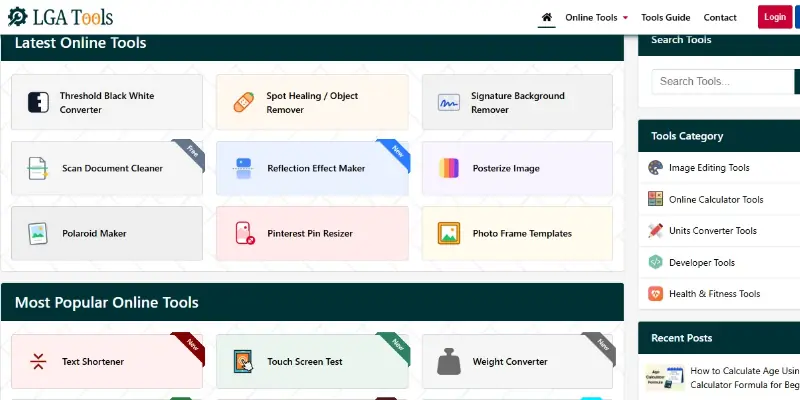
The website was started and developed by the team at Digital Applications. Their main purpose is to give students, writers, developers, and everyday computer users a fast way to solve daily digital problems without downloading big programs. The platform is designed for anyone who wants quick results, from a 5th-grade student doing science homework to a webmaster checking code.
The site features over 500 web tools across many categories, including hardware testing, photo editing, math calculations, text cleanup, unit conversion, and health tracking.
What Tools Does LGA Tools Offer?
To make finding tools easy, LGA Tools com organizes its 500+ utilities into clear groups based on what you want to do:
1. Converters
Fast tools that change numbers or file formats from one unit to another:
- Unit Converters: Length, area, volume, mass, temperature, speed, fuel economy, and weight converters.
- Digital Converters: Data storage converters (like Megabytes to Gigabytes) and frequency converters.
- Binary Converters: Binary to text, hex to binary, and number base switchers.
2. Generators
Tools that create random items, placeholder text, or legal pages:
- Text Generators: Lorem Ipsum placeholder generator, random word generator, and text repeaters.
- Website Generators: Quick privacy policy generators and slug generators for blog links.
3. Calculators
Math and daily life calculators that give you quick answers:
- Everyday Math: Percentage calculator, average calculator, discount calculator, and probability calculator.
- Money & Business: Loan calculator, margin calculator, GST calculator, and PayPal fee calculator.
- Time & Dates: Age calculator, day counter, month calculator, and hour counter.
4. SEO & Webmaster Tools
Helpful utilities for bloggers, marketers, and developers:
- Site Checks: Source code viewer, keyword density tools, and link formatters.
- Code Utilities: Cleaners that format code and check text differences between two documents.
5. Image Tools
Photo editors that let you fix pictures without opening heavy software:
- Image Editing: Photo cropper, image resizer, image flipper, rotator, and photo blur tool.
- Format Converters: Switch between JPG to PNG, PNG to JPG, and PNG to WEBP.
- Utility Features: Image watermarker, image compressor, and image-to-Base64 converters.
6. Text Tools
Writing helpers that clean up messy articles or homework essays:
- Word & Character Counters: Real-time counters showing total words, characters, and reading time.
- Formatting Helpers: Remove empty line breaks, comma separators, text sorters, and duplicate word removers.
- Case Switchers: Change text to ALL CAPS, lowercase, title case, or sentence case in one click.
7. Laptop & Hardware Testing Tools
One of the most popular sections on the site:
- Keyboard Tester: A live on-screen keyboard that lights up keys when you press them.
- Webcam & Mic Checkers: Test if your camera shows video and if your microphone picks up sound.
- Screen & Mouse Testers: Touchscreen tester, dead pixel screen check, and mouse click speed checkers.
8. Health & Fitness Tools
Easy calculators for personal wellness:
- Calorie calculators, protein intake checkers, sugar counters, and fasting window trackers.
Main Features of LGA Tools
When you use LGA Tools com, several practical features make your work easy and convenient:
- Easy-to-Use Tools: Every tool has large buttons, clean input boxes, and simple instructions. You do not need any technical training to use them.
- Instant Results: The tools process your data right away inside your browser. You get your answers in less than a second.
- Multiple Options: Many tools let you customize your settings, such as choosing your preferred image size or selecting specific text filters.
- Download Feature: Tools like the image converter and image cropper include a direct download button so you can save your finished files straight to your computer or phone.
- Copy Feature: Text tools and code viewers feature a one-click Copy to Clipboard button so you can paste results directly into your document.
- Reset Option: A handy clear button lets you empty text boxes or reset numbers with one tap so you can start a new task.
- Mobile Access: The entire website adjusts smoothly to phone screens, letting you use tools on the go without horizontal scrolling.
- Website Embed Option: A built-in code generator allows bloggers and site owners to embed working calculators and testers directly onto their own websites.
How Does LGA Tools Work?
Using any tool on LGA Tools com is as easy as playing an online game. Here is the real step-by-step process:
- Open the Website: Go to lgatools.com on your browser.
- Select a Tool: Click on a category from the top menu, pick an icon on the homepage, or type the tool name in the search bar.
- Enter Your Information: Type your numbers, paste your text, press keys on your keyboard, or upload the picture you want to adjust.
- Click the Required Button: Click the action button, such as Calculate, Convert, or Process. (Some tools, like the keyboard tester or word counter, work live automatically without clicking any button!)
- Check the Result: Look at your answer or edited content displayed clearly right on the screen.
- Download or Copy the Result: Click the Copy button to copy your text, or click Download to save your new image file to your device.
Testing LGA Tools Com
To give you an honest review, I personally tested several tools on LGA Tools. Here is what happened during my testing:
Test 1: The Online Keyboard Tester:
- What I Did: I opened the Keyboard Tester tool and pressed different keys on my laptop, including function keys (F1–F12), the spacebar, Shift, and arrow keys.
- Result: Every key lit up in blue and green on the visual keyboard the exact millisecond I pressed it.
Test 2: The Word Counter & Line Break Remover:
- What I Did: I pasted a messy 500-word draft article with double empty spaces and mixed line breaks into the Text Content tools.
- Result: The word counter instantly showed 512 words and 2,940 characters. The line break remover cleaned up all empty gaps with one click.
Test 3: The Age Calculator & Image Cropper:
- What I Did: I tested the Age Calculator by entering a birth date, and uploaded a 2 MB JPG image to crop into a square avatar.
- Result: The calculator showed the exact age in years, months, days, and even total hours. The image cropper cut the photo cleanly and let me download the cropped PNG instantly.
Overall Test Performance:
- Speed: Super fast. Calculations and key checks happened in real time with zero lag.
- Accuracy: 100% accurate across word counts, age calculations, and unit conversions.
- Errors, If Any: None. All tools loaded cleanly, and no scripts crashed during testing.
LGA Tools Com User Experience
The user experience on LGA Tools is clean, friendly, and simple:
- Design: The site uses a clean white background with colorful, easy-to-understand icons for each tool.
- Navigation: Categories are clearly listed in the top header, and a quick search bar helps you find specific tools in seconds.
- Tool Layout: Every tool page keeps the work area centered on the screen so you can start typing or testing right away.
- Mobile Use: The site works smoothly on Android and iPhone screens without breaking buttons or text.
- Speed: Pages load in under two seconds because the site does not run heavy background scripts.
- Ads & Pop-ups: You do not get blocked by full-screen pop-up ads or countdown timers before seeing your results.
- Ease of Use: It is so straightforward that a 5th-grade student can use it for homework without getting confused.
Is LGA Tools Com Free?
Yes, LGA Tools is 100% free for everyday online visitors:
- Free Tools: You can use all 500+ tools—including keyboard tests, word counters, and math calculators—completely free directly in your browser.
- Usage Limits: There are no daily limits or token counters for regular website use. You can use tools as many times as you need.
- Account Requirements: You do not need an account to use the tools online.
- Paid Embed Plans: If you run your own blog and want to embed tools directly on your website, you can create a free account and log in to view their paid embed plans.
- Hidden Charges: There are no surprise fees or credit card requirements for regular browsing.
Is LGA Tools Com Safe and Legit?
Yes, LGA Tools is 100% safe, legitimate, and secure:
- HTTPS Security: The website uses a valid SSL certificate (HTTPS), ensuring that your connection to the site is private and encrypted.
- Privacy Information & Data Handling: Tools run locally inside your browser session. The site does not store your private text, sell your photos, or ask for sensitive passwords.
- No Suspicious Downloads: You do not have to install executable files (.exe) or browser extensions that could contain computer viruses.
- Legitimate Creator: The site is developed and backed by Digital Applications, an established software agency operating since 2014.
Pros and Cons of LGA Tools Com
Here is a quick summary of the main strengths and limitations of the website:
Pros
- 500+ Free Online Tools: Covers hardware testing, text, image, math, and health tools in one place.
- No Software Installation: Runs directly inside any modern web browser.
- Instant & Accurate: Gives real-time results without loading delays.
- Clean & Easy Design: Simple layout that is friendly for all age groups.
- Embed Feature Available: Allows bloggers to add working tools to their own websites.
- No Annoying Pop-Up Ads: Lets you work peacefully without interruptions.
Cons
- Requires Internet Access: You cannot use the tools when your device is completely offline.
- Basic Image Editing: Great for quick resizing and cropping, but cannot replace full desktop photo editors like Photoshop.
- Embed Plans Require Login: Website owners need an account and paid plan to embed tools on their own websites.
Who Should Use LGA Tools Com?
LGA Tools is helpful for almost anyone who uses a computer or smartphone:
- Students & Teachers: Great for math calculations, unit conversions, and counting essay words.
- Writers & Bloggers: Perfect for formatting text, removing line breaks, and embedding helpful calculators into blog posts.
- Used Laptop Buyers & Gamers: Essential for testing whether keyboards, webcams, mice, and screens work properly before buying hardware.
- Office Workers: Helpful for calculating work hours, figuring out percentages, and converting digital file formats.
- Everyday Web Users: Convenient for quick daily tasks without installing bulky computer programs.
How LGA Tools Is Better Than Its Competitors
When you search for online tools, you will find many websites on the internet. But LGA Tools com does several things much better than other popular tool sites:
- Cleaner Than SmallSEOTools: SmallSEOTools has many writing tools, but its pages are packed with distracting banner ads, video popups, and slow robot captchas. LGA Tools gives you a clean screen where you can do your work without annoying interruptions.
- Easier Than 10015.io: 10015.io is built mainly for expert web coders and programmers. LGA Tools is made for everyday people, giving you simple math calculators, word counters, and health trackers that anyone can use in seconds.
- Better Hardware Testing Than TinyWow: TinyWow is great for PDF files, but it does not have hardware testing tools. LGA Tools lets you test your laptop keyboard, screen, webcam, mouse, and microphone right inside your browser.
- More Variety Than Omni Calculator: Omni Calculator only does math and number formulas. LGA Tools gives you math calculators plus image editors, text cleaners, unit converters, and hardware checkers all on one single website.
- Embed Option for Bloggers: Unlike many competitors that keep all tools locked to their own sites, LGA Tools lets website owners copy embed codes to put helpful tools directly onto their own blogs.
Final Verdict
So, it’s time to wrap up our thoughts on the review of LGA Tools! Overall, LGA Tools is an excellent, reliable platform that makes everyday digital tasks fast and simple.
Having testing tools, picture converters, math calculators, and text helpers together on one clean website means you can get your work done in minutes without installing bulky programs.
Plus, the option for bloggers to embed tools on their own sites makes it a valuable asset for webmasters. It is completely free for direct use, safe, and easy for beginners of any age.
If you want an easy place to test computer hardware or finish daily tasks faster, I definitely recommend bookmarking LGA Tools on your browser. Also, be sure to explore our website too for more honest reviews of helpful websites, apps, and digital tools!
What is your favorite tool on LGA Tools? Tell us in the comments below, and share this guide with your friends!
Frequently Asked Questions
Here are some of the most commonly asked questions related to this LGA Tools review:
1. What is LGA Tools?
LGA Tools is a free online platform that gives you over 500 web tools. You can use it to test your laptop keyboard, edit pictures, count words, do math calculations, and convert units without installing any software.
2. Is LGA Tools really free?
Using the tools directly on the LGA Tools website is completely free for everyone. You do not have to pay anything to test your laptop, resize an image, or use the calculators. However, if you are a website owner and want to embed their tools onto your own blog, they have paid embed plans with different pricing options.
3. Do I need to create an account to use the tools?
No account is required to use the tools directly on the website. You simply open the site, pick your tool, and use it right away. An account is only required if you want to use their embed plans for your own blog.
4. What kinds of tools can I find on LGA Tools?
LGA Tools has tools for many different daily tasks, including:
- Hardware Tests: Keyboard tester, webcam test, mic test, and mouse test.
- Calculators: Age calculator, percentage calculator, and loan calculator.
- Writing Tools: Word counter, text case switcher, and line break remover.
- Image Tools: Photo cropper, image resizer, and image format changer.
5. Can I test a used laptop on LGA Tools?
Yes, this is one of the best ways to use the site. You can open the laptop testing tools on the used computer and check if all keyboard keys, the webcam, the mouse clicks, and the speakers are working properly before buying it.
6. Can I add LGA Tools to my own website?
Yes! LGA Tools has a handy embed feature. You can create an account, view their embed plans, and copy the tool’s embed code to paste it directly into your own blog or website so your visitors can use it without leaving your site.
7. Can I use LGA Tools on my mobile phone?
Yes! The website works smoothly on Android phones, iPhones, and tablets. You can use the calculators and text tools directly inside your mobile web browser anytime you want.
8. Does LGA Tools save my private photos or text?
The tools process your tasks quickly inside your browser session. The site does not store your private text, sell your files, or ask for sensitive passwords.
9. Who built the LGA Tools platform?
LGA Tools is developed and managed by Digital Applications, a known software house and digital agency that has been building web solutions since 2014.
10. Why is an online tool website better than downloading an app?
Using an online tool platform gives you several clear advantages:
- It does not take up storage space on your hard drive.
- You do not have to wait for long software updates.
- It works on any device that has an internet browser.
- You avoid accidental computer viruses from unknown file downloads.






- Be Respectful
- Stay Relevant
- Stay Positive
- True Feedback
- Encourage Discussion
- Avoid Spamming
- No Fake News
- Don't Copy-Paste
- No Personal Attacks
- Be Respectful
- Stay Relevant
- Stay Positive
- True Feedback
- Encourage Discussion
- Avoid Spamming
- No Fake News
- Don't Copy-Paste
- No Personal Attacks
